First Simulation
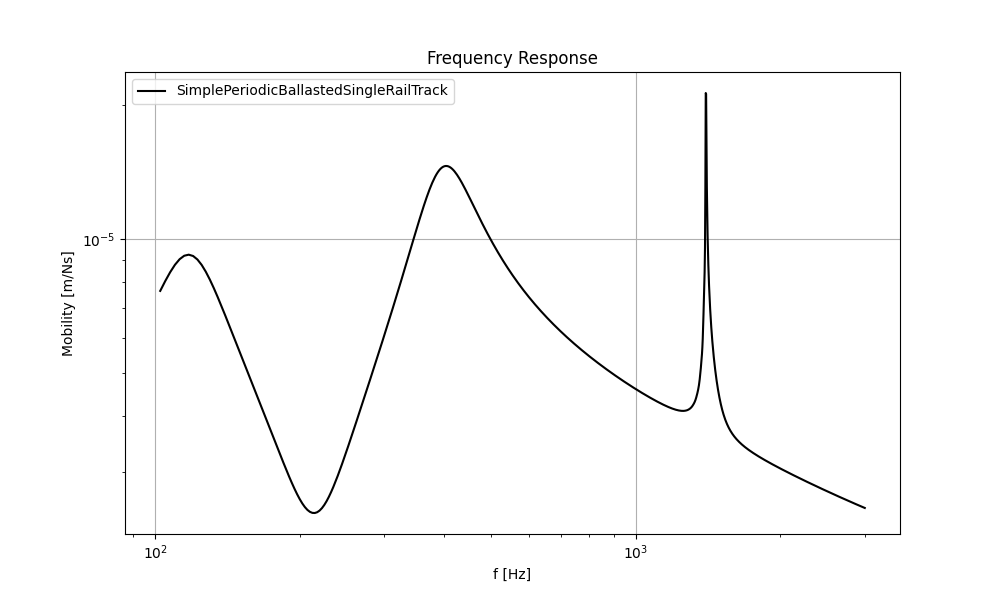
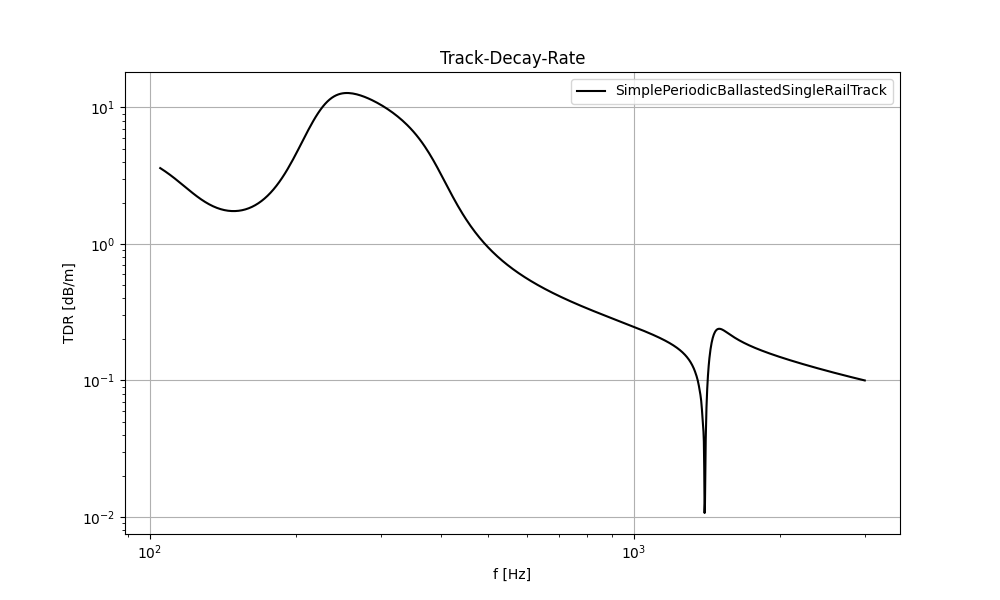
This example determines the track response of a double layer track with discrete mounting positions. The track is excited between two sleepers by a Gaussian impulse.
Python Code
 1  """
 2  Example: Track Vibration Analysis using Rolland API
 3
 4  This example demonstrates how to:
 5      1. Create a railway track model
 6      2. Apply excitation and boundary conditions
 7      3. Run a vibration simulation
 8      4. Analyze and plot the results
 9  """
10
11  # Import required components from Rolland library
12  from rolland import DiscrPad, Sleeper, Ballast
13  from rolland.database.rail.db_rail import UIC60  # Standard rail profile
14  from rolland import SimplePeriodicBallastedSingleRailTrack
15  from rolland import (
16      PMLRailDampVertic,
17      GaussianImpulse,
18      DiscretizationEBBVerticConst,
19      DeflectionEBBVertic
20  )
21  from rolland.postprocessing import Response as resp, TDR
22
23  # 1. TRACK DEFINITION ----------------------------------------------------------
24  # Create a ballasted single rail track model with periodic supports
25  track = SimplePeriodicBallastedSingleRailTrack(
26      rail=UIC60,                 # Standard UIC60 rail profile
27      pad=DiscrPad(
28          sp=[180e6, 0],          # Stiffness properties [N/m]
29          dp=[18000, 0]           # Damping properties [Ns/m]
30      ),
31      sleeper=Sleeper(ms=150),    # Sleeper mass [kg]
32      ballast=Ballast(
33          sb=[105e6, 0],          # Ballast stiffness [N/m]
34          db=[48000, 0]           # Ballast damping [Ns/m]
35      ),
36      num_mount=243,              # Number of discrete mounting positions
37      distance=0.6                # Distance between sleepers [m]
38  )
39
40  # 2. SIMULATION SETUP ---------------------------------------------------------
41  # Define boundary conditions (Perfectly Matched Layer absorbing boundary)
42  boundary = PMLRailDampVertic(l_bound=33.0)  # 33.0 m boundary domain
43
44  # Define excitation (Gaussian impulse between sleepers at 71.7m)
45  excitation = GaussianImpulse(x_excit=71.7)
46
47  # 3. DISCRETIZATION & SIMULATION ----------------------------------------------
48  # Set up numerical discretization parameters
49  discretization = DiscretizationEBBVerticConst(
50      track=track,
51      bound=boundary,
52  )
53
54  # Run the simulation and calculate deflection over time
55  deflection_results = DeflectionEBBVertic(
56      discr=discretization,
57      excit=excitation
58  )
59
60  # 4. POSTPROCESSING & VISUALIZATION -------------------------------------------
61  # 4.1 Calculate frequency response at excitation point
62  response = resp(results=deflection_results)
63
64  # Plot mobility frequency response
65  resp.plot(
66      [(response.freq, abs(response.mob))],
67      ['SimplePeriodicBallastedSingleRailTrack'],
68      title='Frequency Response',
69      x_label='Frequency [Hz]',
70      y_label='Mobility [m/Ns]',
71  )
72
73  #4.2 Calculate Track Decay Rate (TDR)
74  tdr = TDR(results=deflection_results)
75
76  resp.plot([(tdr.freq, tdr.tdr)],
77       ['SimplePeriodicBallastedSingleRailTrack'],
78      title='Track-Decay-Rate',
79      x_label='f [Hz]',
80      y_label='TDR [dB/m]',
81      plot_type='loglog')